
Introduction
This guide explains how Forge connects to Salesforce, what it persists, and where to look when something looks off. It is written for Salesforce admins; planners and end users do not need to read it to use Forge.
Every fact in this guide reflects how Forge is built today — not aspirations. If you find something that looks wrong, the guide is the bug, not the codebase.
What Forge is
Forge is the Blackthorn event operations app. It gives planners a fast, modern interface for running registrations, sessions, sponsors, attendees, communications, and reporting — all backed by the Blackthorn managed packages installed in your Salesforce org.
Because Salesforce remains the system of record, every change you make in Forge is written through to standard Blackthorn objects. There is no separate database of customer records — Forge is a thin operational layer over the schema you already own.
What you can do with Forge
Everything your team needs to plan, run, and measure events — built on the Salesforce data you already own.
Plan & publish events
Create, clone, and schedule recurring series; design an event website with drag-and-drop branding.
Sell tickets & collect payments
Ticket types, add-ons, discount codes, donations, Salesforce-native checkout, and an embeddable widget.
Register & manage attendees
Online registration, check-in, waitlists, group bookings, and bulk import/export.
Build the agenda
Sessions, tracks, speakers, and a visual agenda builder — all linked to your Salesforce records.
Engage your audience
Email composer, scheduled campaigns, automated journeys, audience segments, and surveys.
Run the day-of
Seating & tables, exhibit spaces, hotels & housing, logistics and resources.
Measure everything
Live dashboard, registration and financial reports, and attendee analytics — all in Salesforce.
What's live in Forge today
Forge brings a modern web UI to Blackthorn on Salesforce. Salesforce remains the system of record; Forge is a faster way to use it. Here's what's wired up today, what's in beta, and what's still on the roadmap.
Live today
Available to every signed-in user — no setup required.
- Attendees
- Budget & Expense
- Communications
- Custom Content
- Event Content
- Event Info
- Forms
- Location
- Overview
- Page Designer
- Related Lists
- Reporting
- Sessions
- Settings
- Speakers
- Sponsors
- Staff
- Surveys
- Tickets & Items
- Transactions
- Audiences
- Contacts & Accounts
- Events & Event Groups
- Forms (global)
- Lists
- RSS feeds
- Records
- Reports (global)
- Speakers (global)
In beta — opt in at /beta
Working but still being polished. An admin can flip these on per-tenant from the Beta Features page.
- Accounts & Contacts
- Active Emails Dashboard
- Audience Segments
- Audiences
- Badges
- Campaigns
- Communications (Global)
- Custom Objects in Sidebar
- Custom Profiles
- Data Dictionary
- Day-Of Welcome Email
- Email Template Attachments
- Fees
- Invoices
- Kiosk Check-In
- Native Webinar OAuth
- Navigator
- Notifications Center
- Org Events Calendar
- Payment Gateways
- Per-Path Registration Automations
- Recurring Events
- Roadmap
- ROI Dashboard
- SMS
- Tables & Seating
- Translation Label Overrides
- Translations
- Visibility
- Volunteer Check-in
Coming soon
Toggleable previews on the Beta Features page; not yet recommended for production.
- Attendee Meetups
- Attendee Meetups (Portal)
- Beacon
- Block Ticketing
- Budget Insights & Alerts
- Checkout Flow
- Custom Report Builder
- Outcome ROI
- Pricing Rules
- Push Notifications
- Register on Behalf Of
- Resource Management
- Unified Portal
- Webinar Accounts
Looking for dates and priorities? See the public roadmap.
Architecture overview
Forge is a Next.js application. The browser talks to Forge over HTTPS. Forge talks to your Salesforce org through OAuth-authenticated REST and Composite API calls. Salesforce is the system of record for every customer-facing record.
Forge persists only the tenant's non-PII operational state in Postgres — e.g., tenant rows, sealed OAuth tokens, sessions, audience ID lists, email templates, scheduler jobs, and audit logs. No Salesforce customer record data is ever mirrored to Postgres.
Authentication & sessions
Sign-in uses OAuth 2.0 with PKCE. We never see or store passwords. After Salesforce returns the authorization code, Forge exchanges it for an access token and refresh token, then drops a session cookie called `sid` in the browser.
The session cookie is HttpOnly, SameSite=lax, Secure (in production), and lives for 30 days. The refresh token is sealed with AES-256-GCM and stored in Postgres in `oauth_tokens` (org-level) or `user_tokens` (user-level). Access tokens are short-lived and held only in memory or a Redis cache.
Sponsor and speaker portals use single-use, SHA-256-hashed magic links instead of OAuth. They mint a separate `portal_sid` cookie scoped to the linked record.
Object mapping
Forge does not invent Salesforce object names. On first connection we read your installed sObjects and write a per-tenant `object_mappings` row in Postgres that maps logical keys (Event, Session, Attendee, Form, ...) to the API names actually present in your org.
Allowed namespaces are the Blackthorn managed packages — `conference360__` (Events), `bt_base__` (Base, Forms), `bt_stripe__` (Payments) — plus a small set of standard objects: Account, Contact, Lead, Campaign, CampaignMember, User.
If a logical key has no match in your org we leave it null. Surfaces that depend on it surface a missing-mapping notice; we do not silently fall back to a guess.
| Logical key | Typical Salesforce object |
|---|---|
Event | conference360__Event__c |
Session | conference360__Session__c |
Ticket | conference360__Event_Item__c or conference360__Ticket__c |
Attendee | conference360__Attendee__c |
Form | conference360__Form__c |
Form submission | conference360__Form_Submission__c |
Data residency & PII
Salesforce is the system of record for everything customer-facing. Forge's Postgres database holds operational state only — never copies of customer PII.
- Postgres stores tenant rows, sign-in user rows (email + Salesforce user ID), sessions, sealed OAuth tokens, audience snapshot definitions, audience members as ID-only sets, email templates, scheduler jobs, audit logs, portal session metadata, and per-tenant object mappings.
- Redis is an optional just-in-time hydration cache. Attendee and audience data is cached for 2 hours and then evicted. If Redis is unavailable, Forge falls back to a short-lived in-process cache.
- Audience tables intentionally store `sf_id` only — no name, email, phone, or address ever lands there.
- Salesforce is the only durable home for customer PII.
Cache contract
- Salesforce IDs are the primary cache key component for all entries — no cross-tenant data leakage is possible.
- Attendee name and email are cached for up to 2 hours (keys: event-attendees:{tenantId}:{eventId}) as an approved just-in-time hydration shortcut. These entries are auto-evicted and never written to Postgres.
- Most other Redis entries contain only metadata: permission flags, picklist values, FlexiPage layouts, or configuration booleans. Exceptions are documented in the cache audit: SendGrid suppression lists (short-lived, email only) and record lock entries (short-lived, internal user email). See the cache audit document for the full inventory.
- If Redis is unavailable the app degrades to a short-lived in-process cache with the same TTLs. No data is lost or leaked on Redis failure.
Data persistence & PII
How Forge, classic event pages, and Beacon handle your data: what is stored, what is fetched just-in-time from Salesforce, and how long anything is cached. Salesforce remains the system of record; personal data is not persisted outside Salesforce.
How we classify PII
- Personal data (PII): person name, email address, phone number, postal address.
- Not PII: Salesforce record IDs, counts, timestamps, settings and flags, templates, and B2B company (account) names.
- Policy: derive PII just-in-time from Salesforce; persist only IDs and non-PII state. Enforced by convention and automated PII contract tests.
Classic event pages (Page Designer)
| Data | How it is handled |
|---|---|
| Database | None. Stateless to Salesforce (Redis and filesystem cache only). |
| Page design & branding | Salesforce fields: theme, colors, fonts, logo and favicon URLs, section visibility. Read-through, ~7-day cache with auto-refresh. |
| Custom questions & answers | Salesforce Form, Form Element, and Form Submission objects. |
| Registration | Written directly to Salesforce. Registrant data held only in an encrypted checkout cache (~20 minutes). |
| Caches | Event and form definitions ~30 days; attendee data 15 minutes (encrypted); checkout 20 minutes (encrypted); inventory ~30 days. |
| Images | Cloudinary CDN (lazy upload; metadata cached ~30 days). Source URLs come from Salesforce. |
Forge
| Data | How it is handled |
|---|---|
| Postgres | Non-PII only: tenants, users (internal staff email), sessions, an encrypted Salesforce refresh token (access tokens are never stored), audit logs, email templates, ID-only audience snapshots, and form definitions. |
| Attendee PII | Never persisted to Postgres. Names and emails are derived just-in-time from Salesforce and cached in Redis for about 2 hours, then auto-expired. |
| Forms | Answers are never stored in Forge — validated in memory and written straight to Salesforce. |
| Reports & exports | Streamed from Salesforce; not persisted. |
| Images & files | Salesforce Files (ContentVersion). Forge stores only Salesforce IDs. |
| Caches | Attendee lists ~2 hours; display-name labels 30 minutes; metadata and config 1–60 minutes. |
Beacon (AI copilot · pre-GA)
| Data | How it is handled |
|---|---|
| System of record | Records Beacon creates or updates are written to your Salesforce org. |
| Salesforce data | Queried live per request — never bulk-synced or stored. Schema metadata cached ~5 minutes. |
| Conversation history | Moving to your Salesforce org for general availability. Email and phone numbers are pseudonymized wherever conversation data is processed. |
| Knowledge base | A vector store of Blackthorn product and help content only — no customer personal data. |
| Isolation | Each Salesforce org is fully isolated; no cross-customer data sharing or training. |
| Hosting | AI inference runs on Blackthorn's backend, not inside Salesforce; encrypted tokens and per-org rate limits. |
Where your data lives
Salesforce is your system of record. Forge and our classic event pages keep your contacts' personal details in Salesforce and pull them in only when needed — held briefly in a short-lived cache, then dropped. We store configuration and Salesforce record IDs, not your attendees' personal data.
Classic event pages
- Kept by Blackthorn
- Nothing in a Blackthorn database — pages read from Salesforce. Images served via CDN.
- Pulled live from Salesforce
- Event details, agenda, registration questions, and registrations.
- Cached for
- Minutes for attendee and checkout data (encrypted); page design up to a day.
Forge
- Kept by Blackthorn
- Settings, templates, an encrypted Salesforce sign-in token, and Salesforce record IDs only. Files live in Salesforce.
- Pulled live from Salesforce
- Attendee names and emails, registration answers, and reports.
- Cached for
- Up to about 2 hours for attendee lists, then automatically dropped.
Beacon (AI · coming soon)
- Kept by Blackthorn
- Records it creates go to your Salesforce org. Conversation history will live in your Salesforce org at launch.
- Pulled live from Salesforce
- Your event and CRM data, queried live — never bulk-copied.
- Cached for
- Conversation context is short-lived; product help content (not your data) powers its knowledge base.
What counts as personal data
We treat names, email addresses, phone numbers, and postal addresses as personal data and keep them in Salesforce. Record IDs, counts, settings, and company (account) names are not personal data and may be cached to keep things fast.
Permissions & sharing
Forge inherits the permissions of the Salesforce user who signed in. We do not bypass Field-Level Security or sharing rules — every read and write goes through the standard Salesforce APIs as that user.
- Make sure the connected user can read and write the Blackthorn objects you expect to use in Forge.
- Set FLS on every custom field you intend to surface in Forge — fields the user cannot see in Salesforce will not appear in Forge either.
- Server-initiated writes go through the managed fflib-based CRUD executor in the Blackthorn package, so they respect the same rules.
- Portal sessions (sponsor, speaker) are scoped to a single record and never inherit broader org access.
MCP
Forge runs a Model Context Protocol (MCP) server so Claude, ChatGPT, Gemini — or any other MCP-compliant client — can read and write your Blackthorn Events data directly, using the connected user's own Salesforce session and permissions. It's the same data your team already sees in Forge; nothing is duplicated into a separate store.
MCP does not provision a tenant on its own. An admin must complete Salesforce connection setup in Forge (see the Setup checklist, Admin → Setup) before the org has anything for an AI assistant to read — the first successful Forge/Salesforce OAuth handshake is what creates the tenant MCP later connects to.
Connect
- In your assistant's settings, look for Connectors, Integrations, or Custom MCP servers — most clients call this a custom connector.
- Enter https://forge.blackthorn.io/api/mcp as the server URL.
- Choose OAuth if it's offered — you'll be sent to a Salesforce login, and signing in is the only consent step. Your assistant never sees or stores your password.
- If your client doesn't support OAuth for custom connectors, mint a bearer token instead (Settings → API tokens) and paste it into the connector's auth field.
Client-specific notes
Claude
- Recommended: in Claude's connector directory, search for "Blackthorn Beacon" and click Install — no URL to type.
- Or manually: in Claude, open Settings → Connectors → Add custom connector.
- Claude Code users can install the bundled plugin instead — it wires up the connector and adds workflow skills in one step.
ChatGPT
- Settings → Connectors → enable Developer mode, then Create connector using the URL above.
- Choose OAuth as the authentication type. Availability depends on your ChatGPT plan and workspace settings.
Gemini
- Extensions or Connectors settings → Add custom connector, using the URL above.
- Choose OAuth. A Google Workspace admin may need to allow custom connectors first.
Tool catalog
Every tool carries one of three scopes — read, write, or delete — enforced by whichever auth method connected the client (OAuth-authenticated user, static bearer token, or session cookie).
| Family | Representative tools |
|---|---|
| Reporting & analytics | planner_get_dashboard, planner_get_event_metrics, planner_get_roi, planner_get_registration_funnel, planner_get_email_metrics, planner_export_attendees |
| Events, sessions & tickets | planner_create_event, planner_update_event, planner_clone_event, planner_create_session, planner_create_ticket |
| Attendees & registrations | planner_create_attendee, planner_update_attendee, planner_checkin_attendee, planner_list_attendees, planner_get_attendee |
| Forms | planner_create_form, planner_add_form_question, planner_create_managed_dropdown, planner_clone_form |
| Email & audiences | planner_schedule_email, planner_list_segments, planner_get_email_template |
| Delete (always confirmed) | planner_delete_event, planner_delete_attendee, planner_delete_form — every delete requires confirm: true, or the call is refused with no data change |
| SOQL / describe escape hatch | planner_soql_query (read-only SELECT, DML rejected), planner_describe_object |
Permissions & scope
Your assistant can only do what your own Salesforce login can already do. MCP inherits your existing read, write, and delete permissions for your tenant and org — it never has broader access than you do inside Forge.
One prerequisite: an admin needs to have connected your Salesforce org to Forge at least once (Admin → Setup) before your assistant can return live data. MCP connects to that same tenant — it doesn't create a new one.
- MCP inherits the connected user's actual Salesforce permissions — it never bypasses Field-Level Security or sharing rules, same as every other Forge integration (see Permissions & sharing above).
- Three scopes: read (all list/get tools), write (create/update/check-in/schedule), delete (all delete tools). A bearer token can be minted with any subset; an OAuth or session-cookie connection gets read+write+delete.
- Portal-session connections (magic-link attendee/sponsor/speaker access) are restricted to read-only tools scoped to that portal's single event.
- Tenant and user identity are always resolved server-side from the authenticated session — never accepted as a client-supplied parameter.
Security
- OAuth 2.1 with mandatory PKCE (S256) — no long-lived shared secret, refresh tokens rotate on use, and a stolen one-time auth code is unusable without the original client's code_verifier.
- Every tool call is audit-logged (tenant, user, tool name, parameter shape) with PII redacted before it's persisted.
- 60 requests per minute per tenant; responses over 80KB are truncated with a message to paginate or filter instead of silently dumping partial data.
- If the Salesforce connection is broken or rate-limited, every tool returns a structured error with a one-click reconnect link, instead of a generic failure.
- Salesforce access tokens are never included in a tool result — sealed and cached server-side only.
Sample things to ask
- “What events do we have coming up in the next 30 days?”
- “Give me a dashboard summary — attendees, revenue, and email performance across all our events.”
- “Create a test session called "QA Walkthrough" on [event] from 2–3pm.”
- “Check in [attendee name] for [event].”
- “What's the open rate on our last campaign?”
- “Delete the test session I just made.”
See it in action
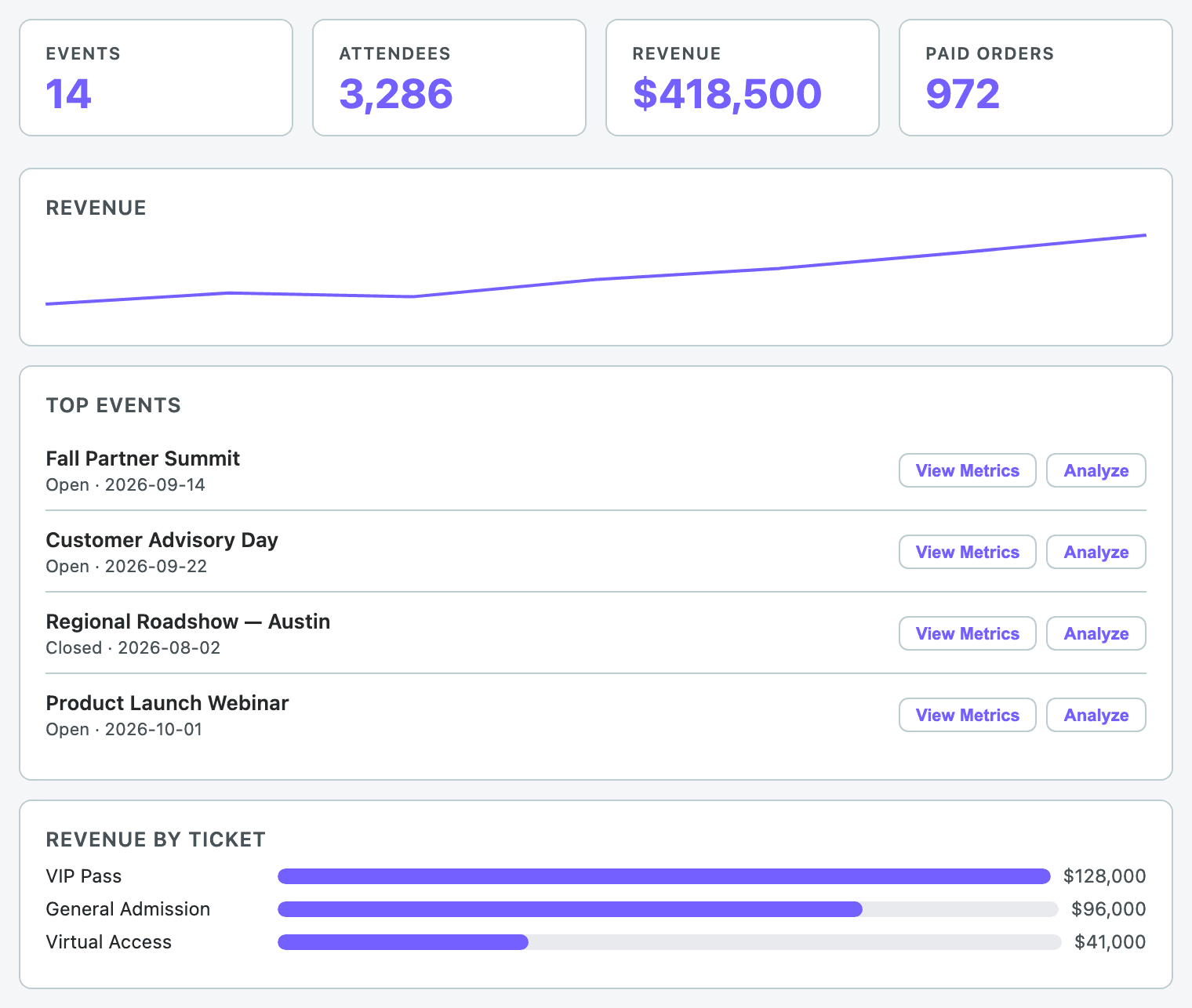
Dashboard
“Give me a dashboard summary across all our events.”
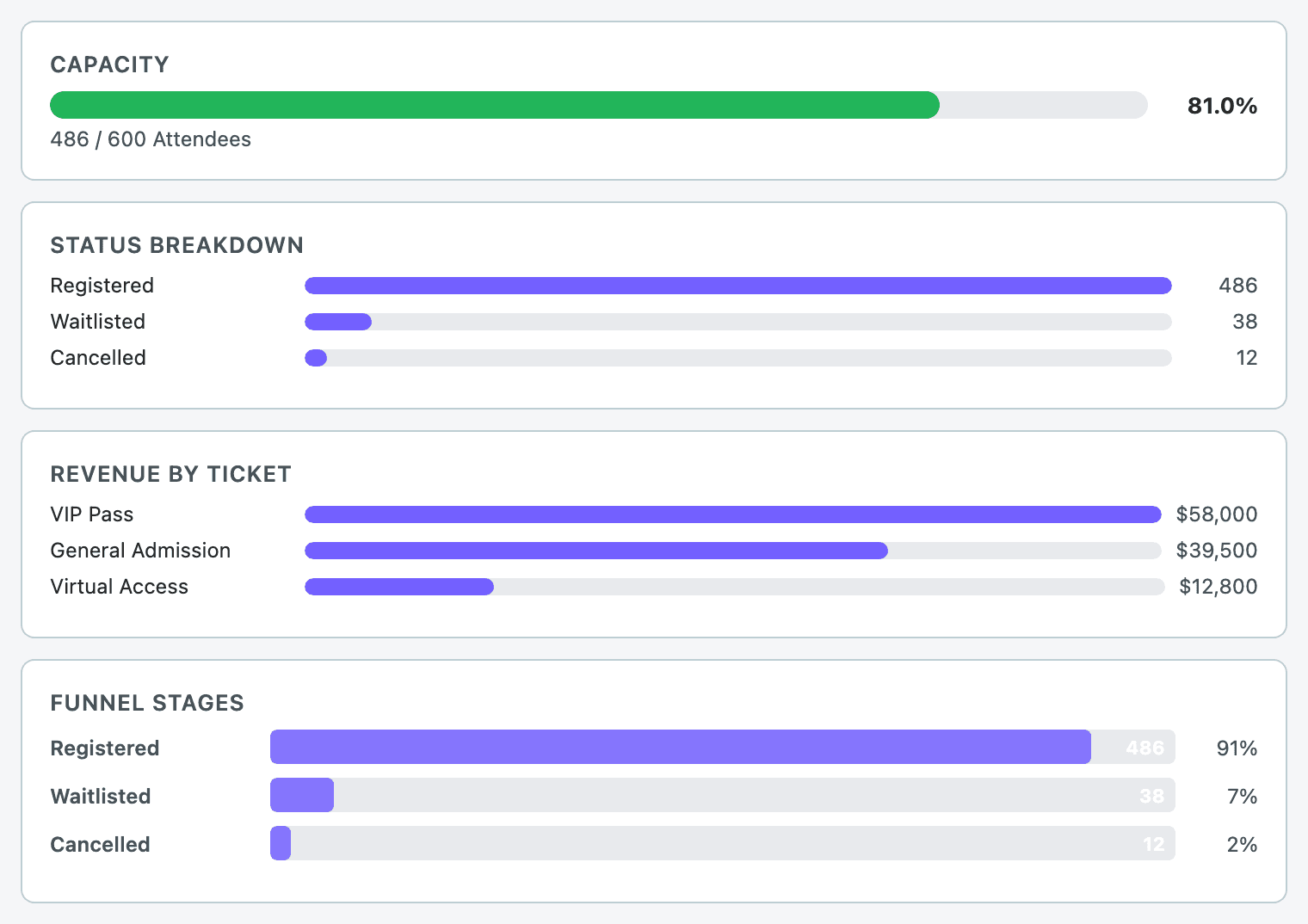
Event metrics
“What's the capacity and registration funnel for this event?”
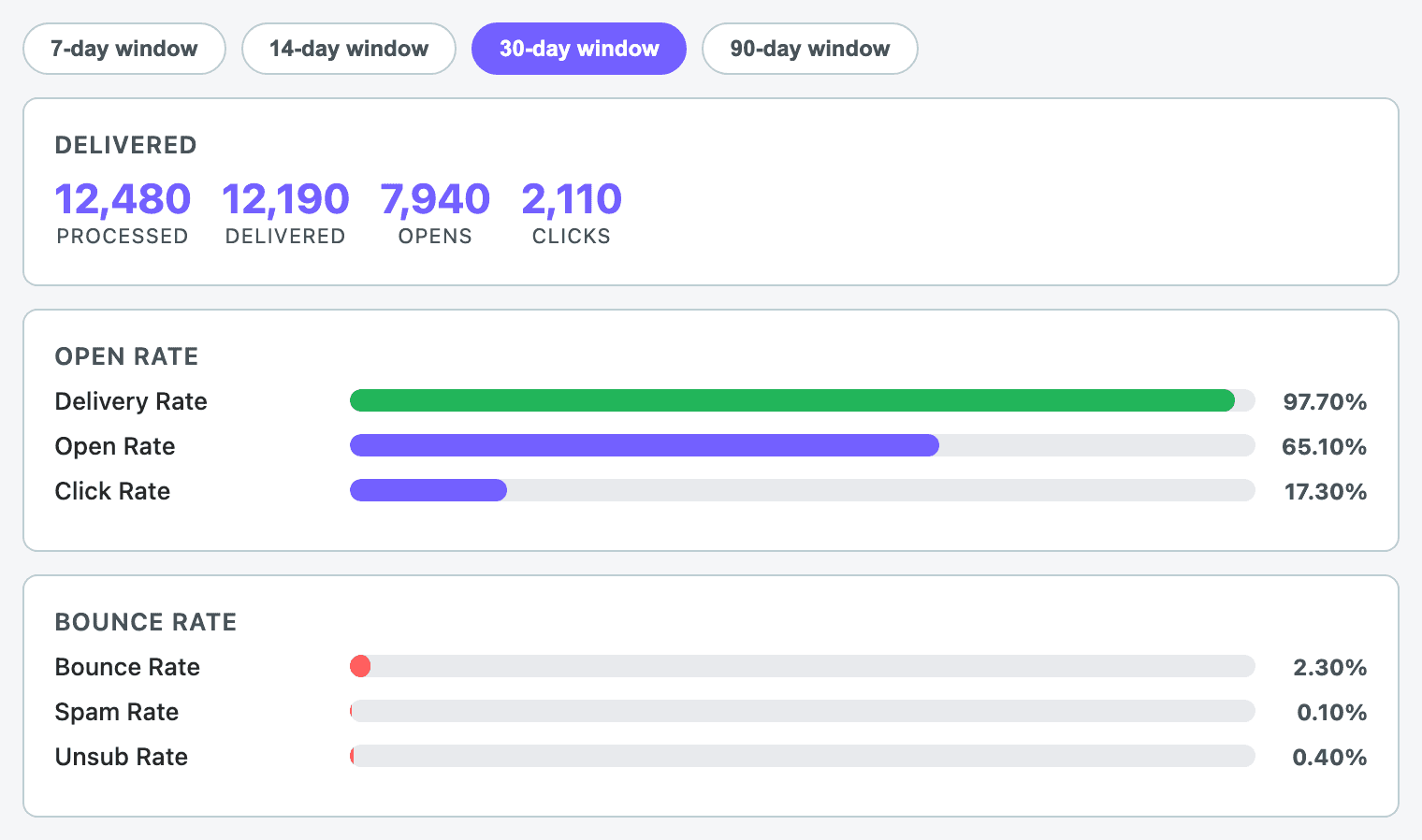
Email performance
“What's the open rate on our last campaign?”
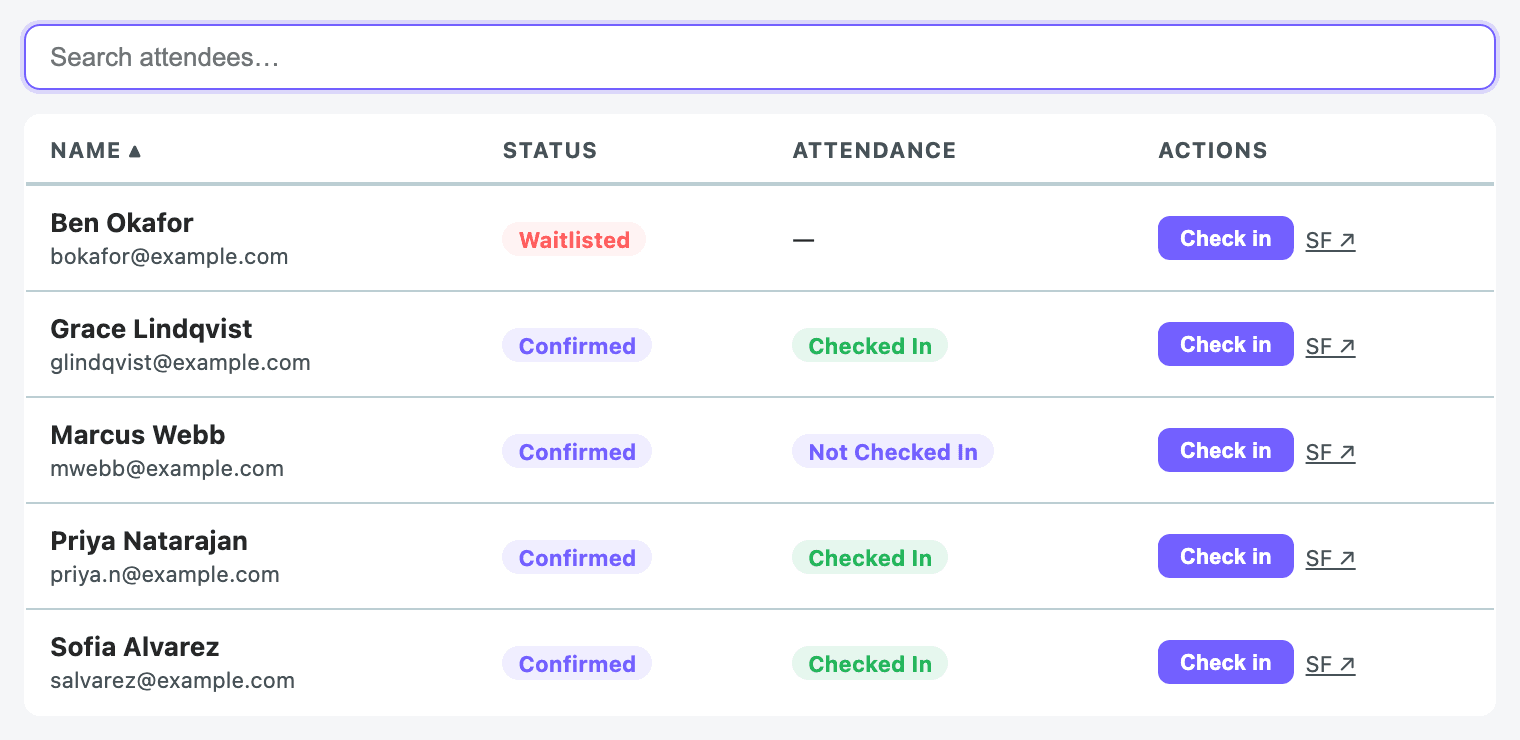
Attendee check-in
“Check in this attendee for the event.”
Salesforce platform features
Forge writes through standard Salesforce REST and Composite APIs as the signed-in user. That means every platform feature your admin has configured runs the same way it does in Salesforce itself — Forge does not bypass anything.
- Validation rules: Run on every save. If a rule fails, Forge surfaces the error inline next to the offending field, with the field's label resolved from describe metadata.
- Record types: When a surface supplies a RecordTypeId, Forge writes it. Page layouts per record type are honoured when the layout describe is fetched.
- Apex triggers, Process Builder, and Flows: Execute server-side automatically because Forge writes through standard APIs. Their errors propagate to the user the same way validation errors do.
- Field-Level Security: Reads honour FLS automatically — fields the user can't see in Salesforce don't appear in Forge. Writes that violate FLS surface a Salesforce error; some layouts also pre-filter to writable fields based on describe metadata before rendering.
- Sharing rules and record-level access: Implicit. Forge calls Salesforce as the signed-in user, so any record the user can't access in Salesforce is invisible to Forge too.
- Permission sets and profiles: Enforced by Salesforce on every API call. Forge has no separate authorisation layer to bypass them.
- Server-initiated writes: Routed through the managed fflib-based CRUD executor in the Blackthorn package, which respects the same rules.
- Org locale, currency, and timezone: Forge uses its own locale cookie for UI strings. Org-level currency, locale, and timezone defaults are not yet auto-applied — this is a known gap, not a design choice.
Sync, caching & background jobs
- When you sign in, Forge refreshes your organization's most active Salesforce data in the background — events, sessions, tickets, registration forms, sponsors, speakers, and attendees typically update within a few minutes.
- Less frequently changing data — such as rooms, tracks, keywords, translations, and fundraising records like auctions, donations, and pledges — refreshes on a longer cycle and can take up to a few hours to catch up.
- Email send schedules are handed off to the Smart Scheduler service, which calls back into Forge to deliver each batch.
- Internal cron endpoints under `/api/cron/*` run housekeeping — for example, pruning login events older than 90 days.
- If something you just changed in Salesforce doesn't appear in Forge right away, wait a few minutes and refresh the page — for less frequently updated data, give it a few hours before contacting support.
- Redis cache reads and writes are wrapped in try/catch; the app degrades to in-memory caching if Redis is unavailable.
Troubleshooting
A Forge surface says "object not mapped"
Confirm the underlying Blackthorn object is installed and accessible to the connected user, then re-run the mapping by reconnecting the org from `/admin`. Object mappings are populated at OAuth time; if the package was installed afterwards, reconnect.
A user sees blank fields where data should be
Check Field-Level Security for that user's profile. Forge cannot show fields that Salesforce hides from the connected user.
Sign-in keeps bouncing back to /
The session cookie may have expired or the refresh token may have been revoked. Sign in again. If the loop continues, check `/admin` for an OAuth error indicator and reconnect.
Data looks stale right after a Salesforce edit
Forge caches some hydrated reads in Redis for up to two hours. Use the refresh control on the surface, or wait for the cache to expire — the next read will fetch fresh from Salesforce.
Ready to take a closer look?
Sign in with your Salesforce credentials, or talk to your Blackthorn contact.